What it does
Play your music, untouched.
Point it at your music — on a NAS, a cloud drive, or on the device — and play. Bareplay reads the original samples and hands them to your DAC at the file's native rate (and, for convenience, plays locally without one too). The only thing it ever changes is a disclosed DSD→PCM fallback — always labeled, never silent.
Lossless & uncompressed PCM
WAV, FLAC, ALAC and AIFF play bit-perfect — the exact integer samples, at the file's native sample rate.
DSD over DoP
.dsf and .dff stream to your DAC as native DSD via DoP — as high as your device and DAC will lock the rate. No conversion in the default path.
The one exception
When a DAC can't lock native DSD over DoP, Bareplay falls back to converting it to PCM — automatically, only when needed, and always badged. Never silent.
What "bit-perfect" means here
Honest about what software can prove — and what it can't.
Bareplay does everything an app can toward bit-perfect output: it decodes the original integer samples with no conversion, adds no resampling, volume, EQ or mixing, and locks your DAC to each file's native sample rate. When the hardware locks that rate you get a clear ✓; if iOS has to resample, it still plays but the badge warns you — disclosed, never hidden.
What no iOS app can do is see past the system audio layer to confirm what the DAC physically receives. So the badge is an honest first-line check, not a proof. To actually prove it, Bareplay includes built-in Test Signals: you capture the output externally, then analyze it right in the app under Settings → Analyze a recording.
Every track shows you exactly what's happening — the badge names the lock; the detail line traces the file to your DAC:
The label names the locked state; the ✓ / ⟳ / ⚠ symbol and the detail line show whether anything left the bit-perfect path — green PCM LOCKED is a native PCM file, gold DSD→PCM LOCKED (⟳) is a DSD→PCM conversion that then locked, and red RESAMPLED BY iOS (⚠) is iOS coercing the rate.
And here is that proof. Two of the built-in bit-exact test signals — PRNG sequence · 96 kHz and Walking-bit · 96 kHz — were sent to a USB DAC, captured on the USB link, and analyzed back in Bareplay: bit-exact — every sample, both channels, all 24 bits intact.
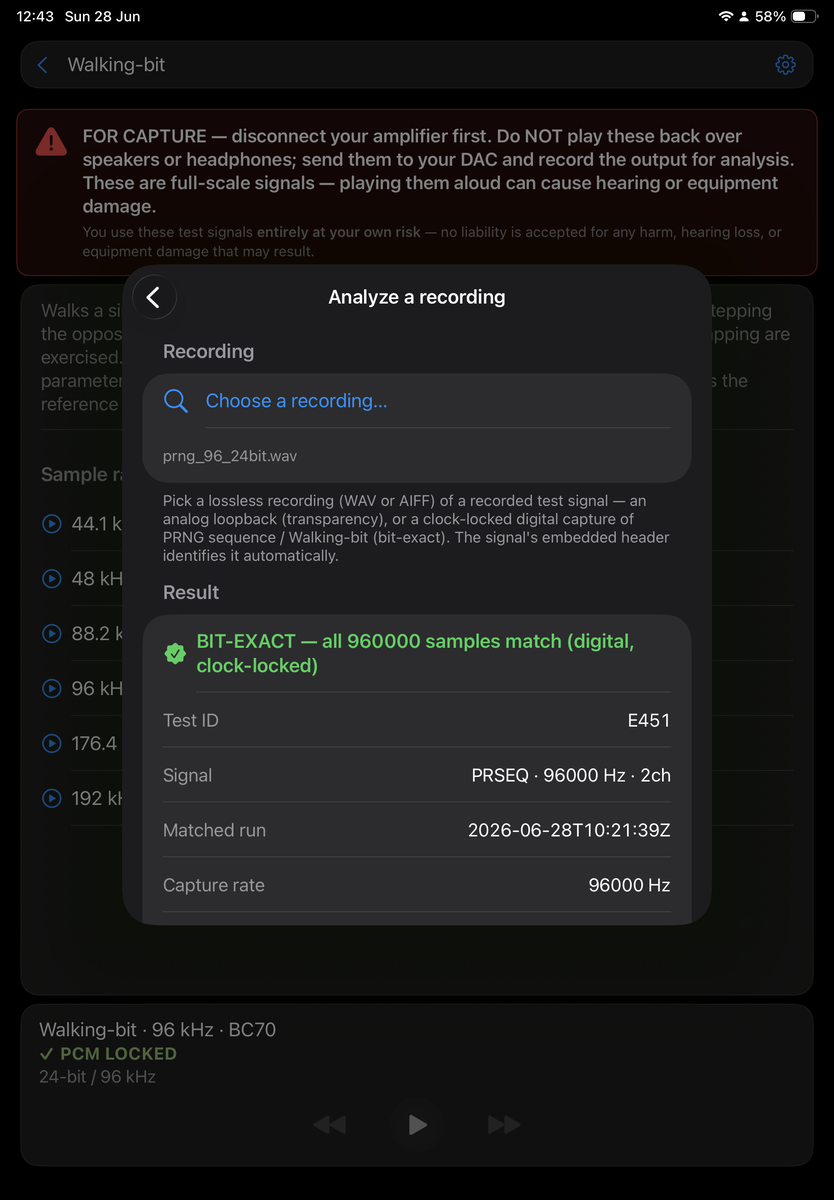
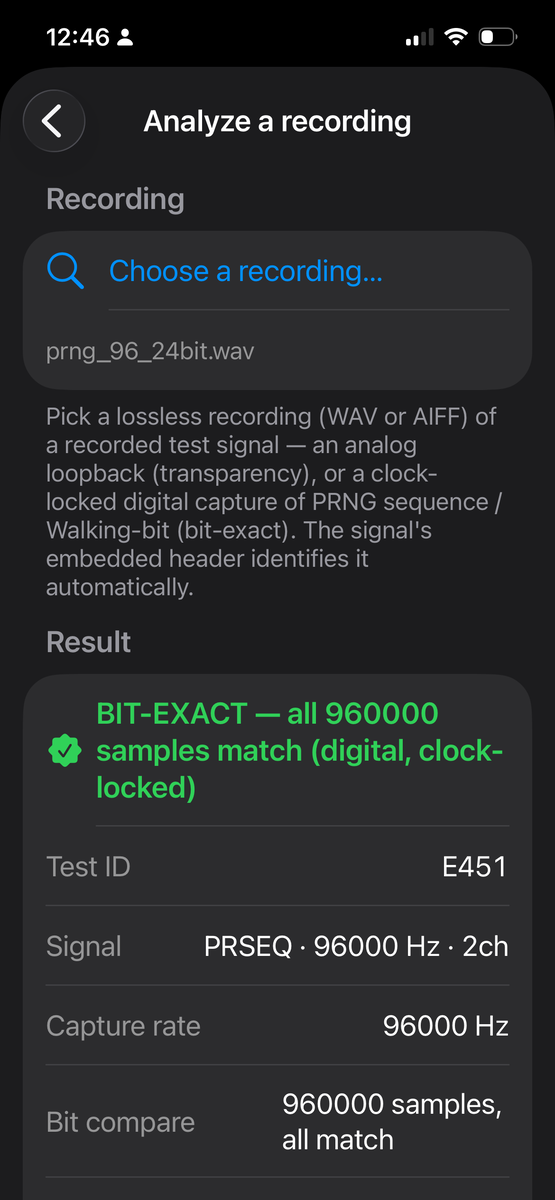
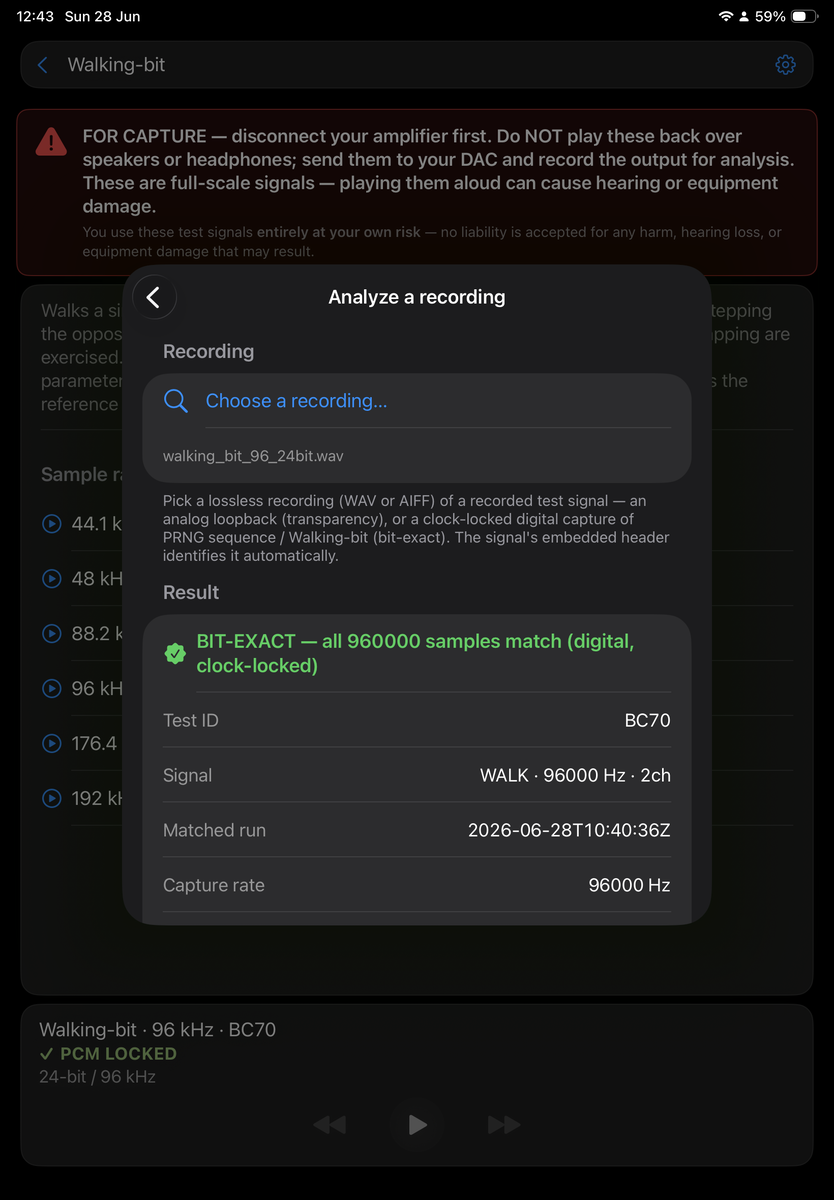
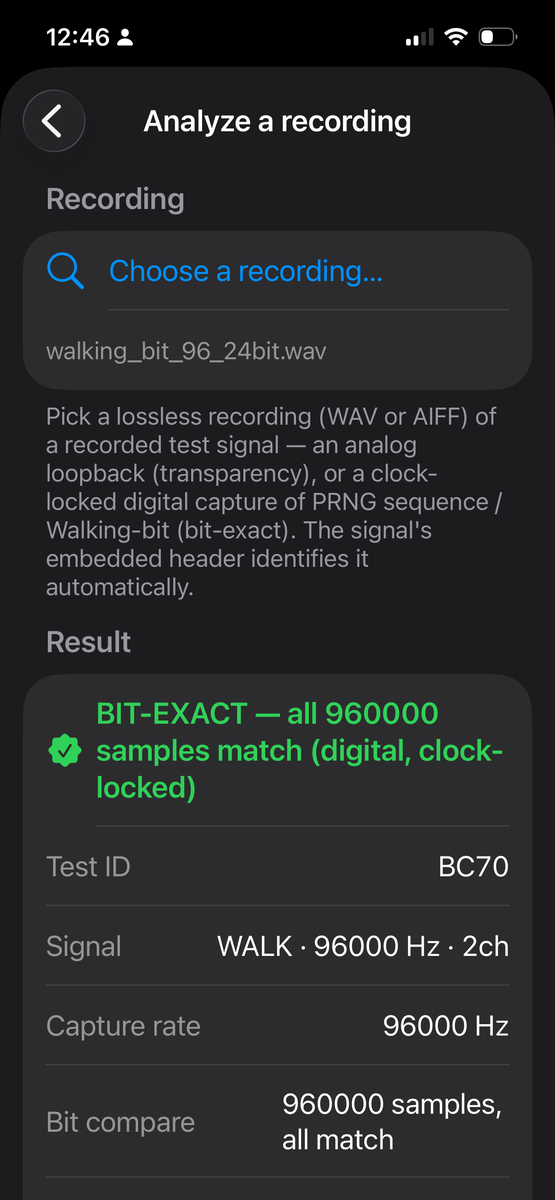
PRNG sequence 96 kHz and Walking-bit 96 kHz test signals, captured on the USB link to a Benchmark DAC2 HGC with a Teledyne LeCroy Mercury T2C USB analyzer (export data transfer out) and converted to audio files in Audacity (import raw data as 32-bit; export as 24-bit / 32-bit with dithering off), then analyzed on the Bareplay app.
DSD
Native DSD — or an honest conversion.
DSD is a first-class citizen here, not an afterthought. Bareplay plays your .dsf and .dff files as native 1-bit DSD over DoP, straight to your DAC — as high as your device and DAC will lock the carrier rate, with no conversion in the default path.
When a DAC can't accept native DSD, Bareplay doesn't fail and doesn't hide it: it converts to PCM and tells you — a gold ⟳ DSD→PCM LOCKED badge, never a silent downgrade. You pick the behavior in Settings: strict native-only, automatic fallback (the default), or always convert — with a choice of conversion filters when it does.
Features
Everything it needs. Nothing it doesn't.
No accounts, no streaming services, no tag database, no artwork scraping. Just the parts that matter for getting clean audio to a good DAC.
Bit-perfect — and honest about it
Decodes the original integer samples and locks your DAC to each file's native rate — no resampling, volume, EQ or mixing. A badge shows the lock, and tells you honestly on the rare occasion iOS resamples.
Plays your formats
WAV, FLAC, ALAC and AIFF play bit-perfect; DSD (.dsf / .dff) plays native over DoP, or converts to PCM only when a DAC can't take it. Lossless only, stereo and mono.
Rides the Files app — on purpose
SMB, WebDAV, Dropbox, iCloud or local: if it's in the Files app, Bareplay plays it. By design it contains no networking code and stores no passwords — your connections live in iOS, where they belong.
No extra streamer needed
Your iPhone or iPad is the transport — plug the DAC straight in and play your NAS or cloud files, no Raspberry Pi, network bridge or dedicated streamer in the chain. And a streamer can stream Tidal or Qobuz but not Apple Music, so the phone's in your setup anyway.
Live folder browser
No indexing, no waiting for a library to build. Browse folders directly and play a track or a whole album as a queue. Cover art and booklets that live in the folder — images and PDFs — open right in a viewer you can swipe through.
Gapless playback
Same-rate tracks flow into each other with zero gap — albums and live recordings play through seamlessly.
Lock-screen & background play
Keeps playing with the screen locked, with track info and play, pause and next / previous on the lock screen and Control Center.
Fully native, no trackers
Built on Apple frameworks with no third-party libraries — no analytics, no networking code. Files are decoded by Apple's own audio decoders; the DoP output and DSD→PCM conversion are our own code, since iOS ships no framework for either.
Built-in analysis (optional)
Want to prove the output is bit-perfect? Built-in Test Signals generate reference tones and patterns you capture off the DAC and analyze on-device. It's there if you care to check.
Formats
What it plays.
PCM up to high sample rates at native bit depth. DSD over DoP, as high as your device and DAC will lock the carrier rate. DST-compressed DSD is supported as an experimental, opt-in decode. Stereo and mono only — it's built for a two-channel USB DAC, so multichannel files aren't played. ALAC files carry the .m4a extension; a lossy .m4a (AAC) isn't played — Bareplay is lossless only.
| Format | Tested bit depth | Max tested rate |
|---|---|---|
| WAV | 24-bit | 768 kHz |
| AIFF | 24-bit | 768 kHz |
| FLAC | 24-bit | 384 kHz |
| ALAC | 24-bit | 384 kHz |
| DSD .dsf / .dff | 1-bit | DSD256 |
Tested at 24-bit (16-bit should work anyway). Uncompressed WAV/AIFF reach the highest rates; FLAC and ALAC are limited by Apple's decoders, and your DAC's lock rate is a further ceiling. Higher rates may work but aren't tested.
A look at it
One screen. A browser and a player.
No tabs, no menus to get lost in: a full-width file browser with a player docked at the bottom.
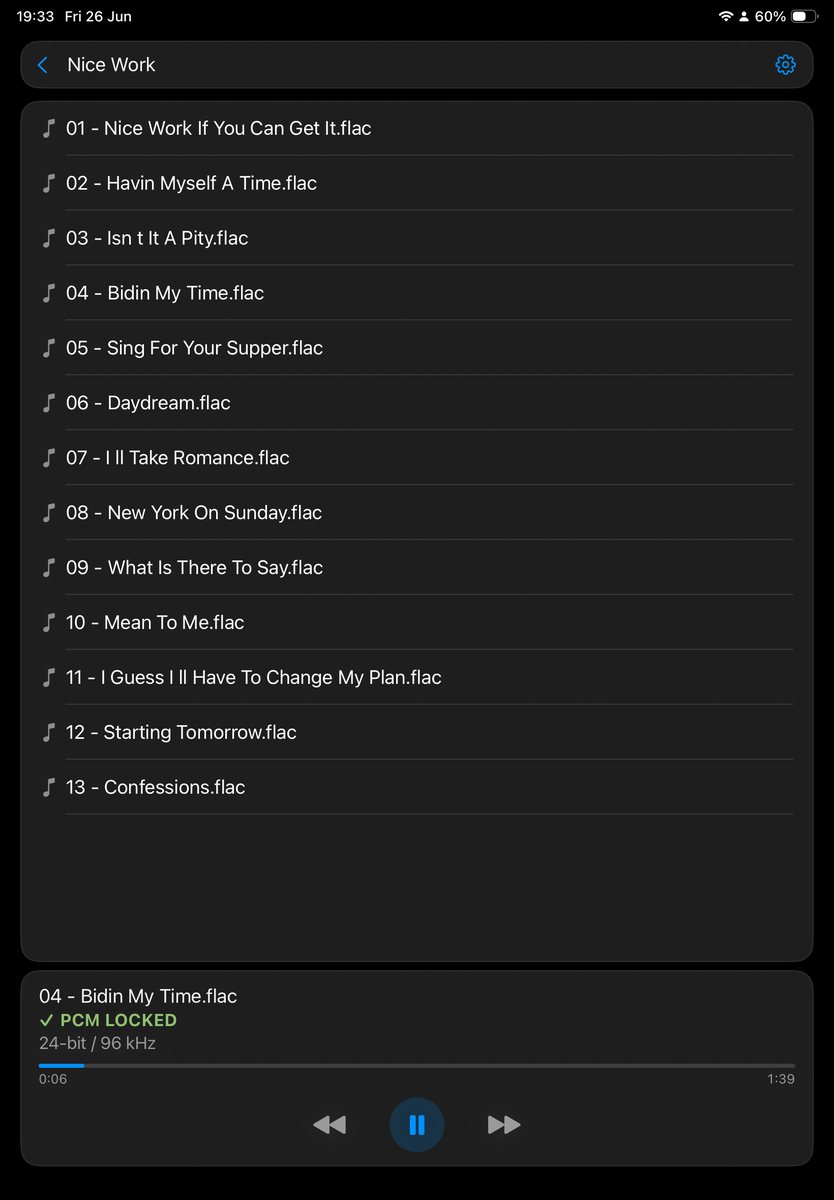
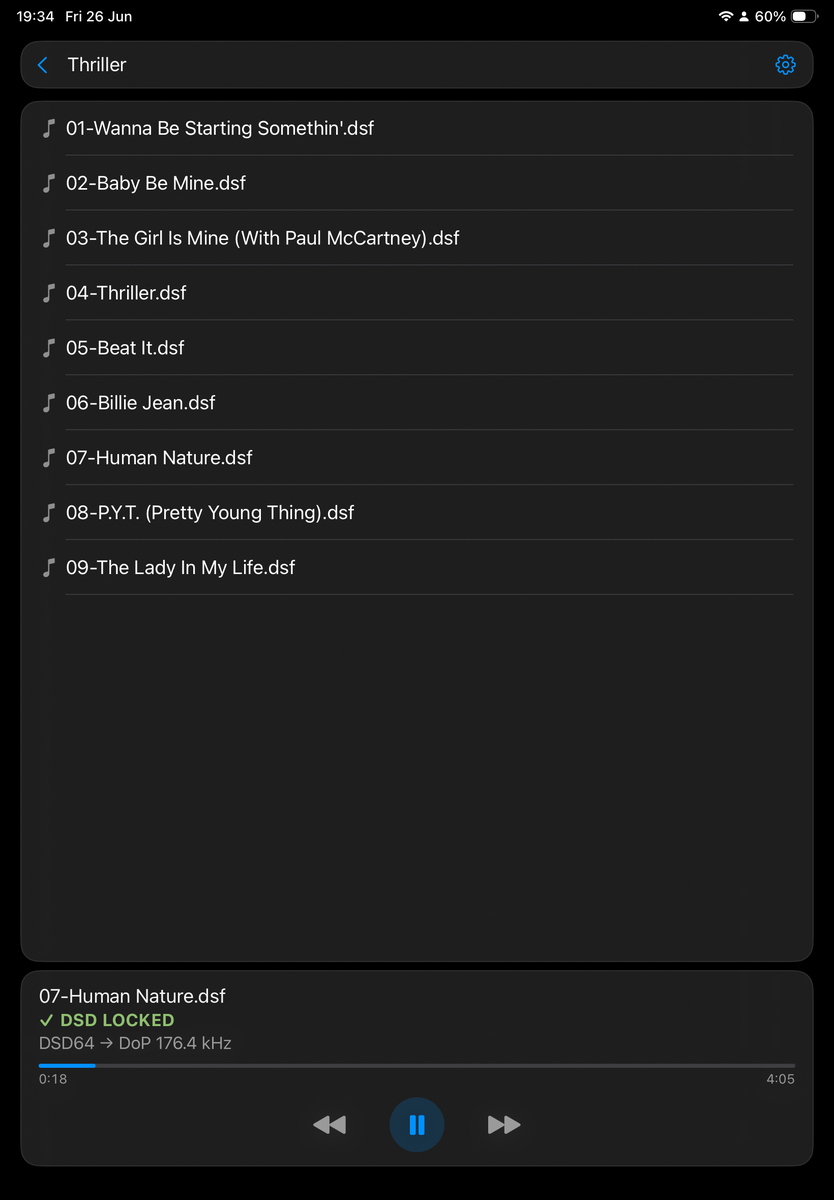
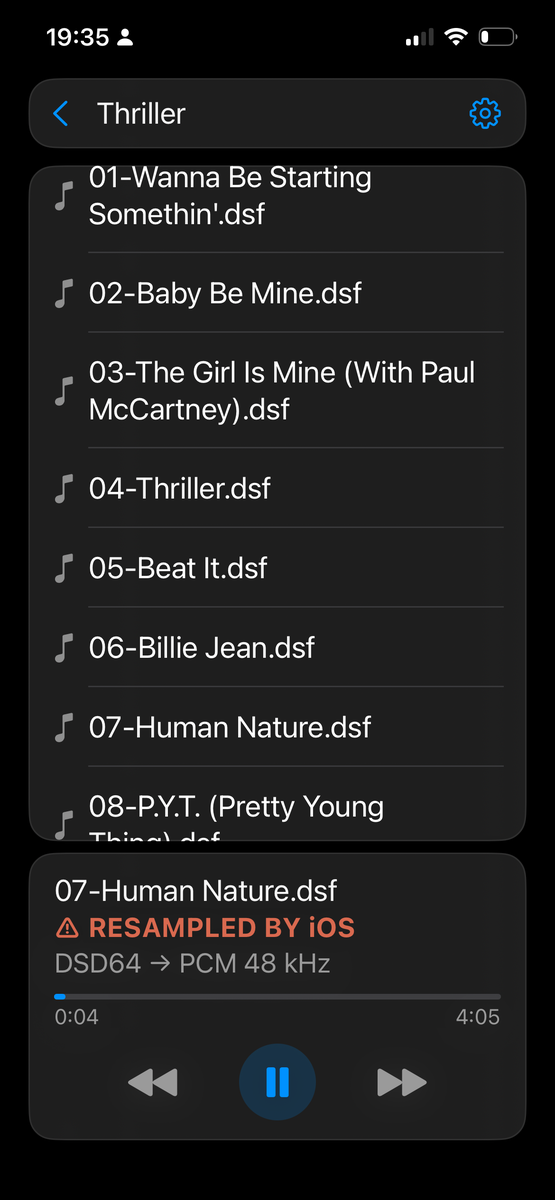
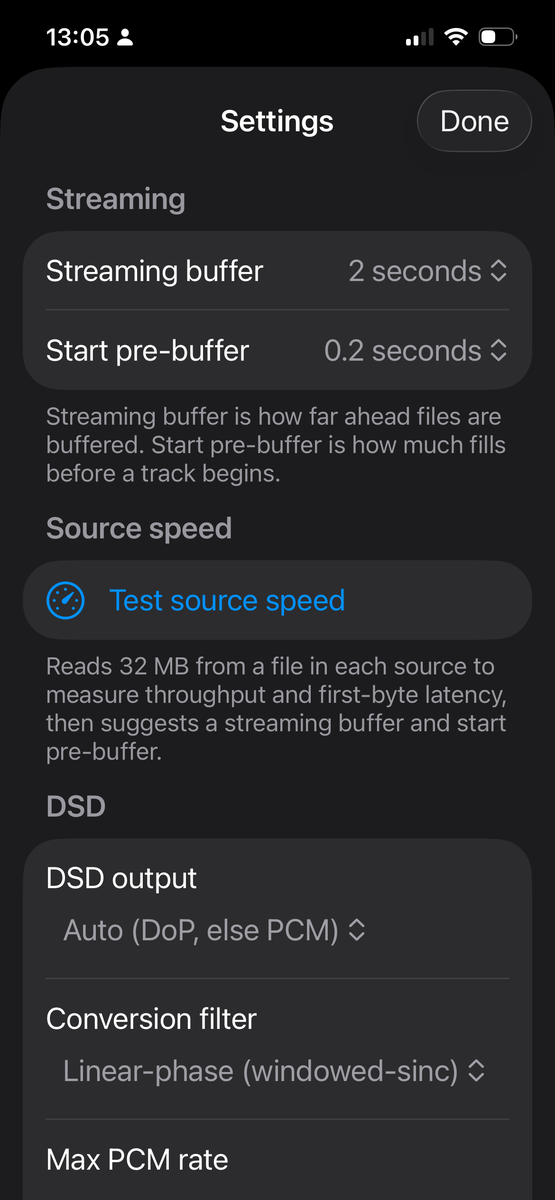
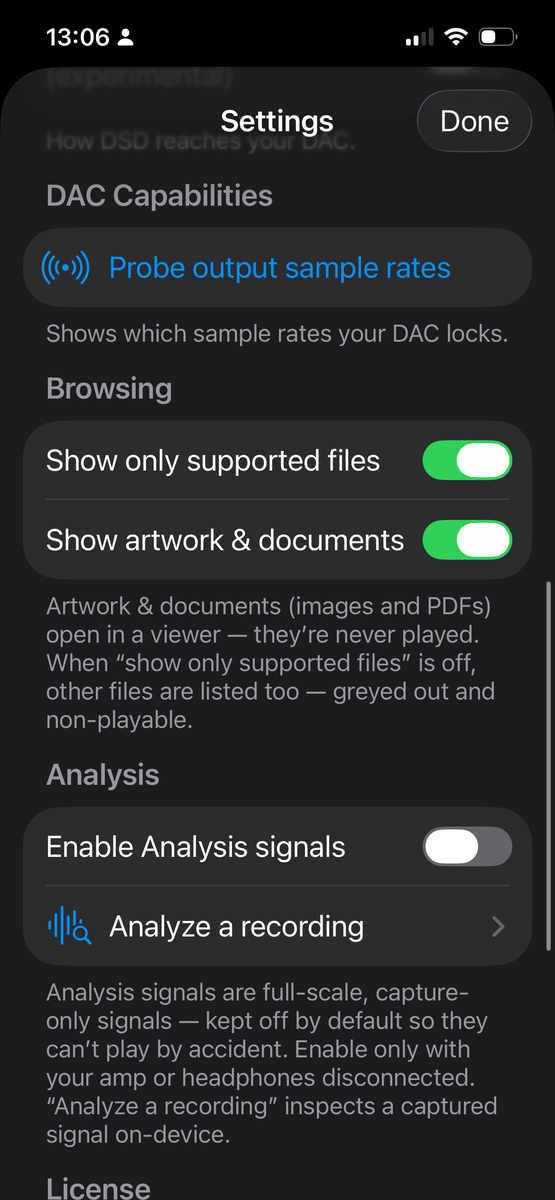
Actual screenshots from iPhone and iPad.
Why I made it
A player that gets out of the way.
I built Bareplay because I didn't like the players I could find. They all wanted to be more than a player — libraries, accounts, effects, a look.
I wanted the opposite: a bare, functional app that does one job well — play my uncompressed and DSD files exactly as they are, straight to the DAC, with no processing in the way.
I'd also moved from Tidal and Qobuz to Apple Music — and a streamer can play those, but not Apple Music, so that side of my listening runs through an Apple device, with the DAC on the end. To play my own hi-res and DSD files too, the usual fix is to add a network streamer — and now two boxes want the DAC's one USB input, so you swap by hand, or add a USB switch, to choose which one drives it.
Bareplay removes the second box. The Apple device I already use plays my own PCM and DSD files bit-perfect over USB to the same DAC — no streamer, no switch, nothing to re-plug. Higher-rate DSD wants USB anyway; it outruns what optical and S/PDIF can carry.
It looks plain on purpose. The point is what comes out of the DAC, not what's on the screen — and it will stay that way.
FAQ
Good to know.
What does it cost?
A 30-day free trial, then a one-time $9.99 purchase — no subscription, no ads, no accounts. Buy it once and it's yours. ($9.99 is the US price; your local App Store price may differ.)
Do I need a USB DAC?
No — Bareplay plays your local and network files just fine on the device's own output. But it's built around sending audio to an external USB DAC bit-perfect, and that's the way it's meant to be used.
Does it play multichannel / surround files?
No — Bareplay plays stereo (2-channel) and mono only. It's built for a two-channel USB DAC, so multichannel files (5.1 surround, quad, multichannel SACD rips) aren't played: tapping one shows a short "mono and stereo only" message instead of half-playing it. Multichannel isn't planned.
Does it ever change my audio?
Bareplay itself never alters your samples — no resampling, volume, EQ or mixing. PCM (WAV/FLAC/ALAC/AIFF) and DSD-over-DoP play untouched. The one change the app can make is DSD→PCM conversion for DACs that can't accept native DSD. By default (Auto mode) this happens automatically only when the DoP rate won't lock — always disclosed (a gold ⟳ and a DSD → PCM line), never silent. See the DSD mode question below to make it strict or always-on.
There's a second case, but it's iOS, not the app: if the hardware can't lock a file's native sample rate, iOS resamples to a rate it can. Bareplay never adds that conversion itself — it discloses it with the ⚠ RESAMPLED BY iOS badge so you always know.
What about DST-compressed DSD?
DST is the lossless compression found on some DSD and SACD rips. Bareplay can decode it, but the feature is experimental and off by default: DST is hard to test and verify — a subtly wrong decode comes out as noise rather than failing gracefully — and it hasn't been confirmed on real hardware. You can turn it on in Settings; otherwise DST files are skipped with a note. If you try it and run into problems, please get in touch.
How does Bareplay play DSD?
Three modes in Settings, with Auto the default — and the right choice for most:
Auto — plays DSD bit-perfect over DoP when your DAC locks the carrier rate, and only if it can't, falls back to converting to PCM. Always plays, always badged. Play as DoP — strict: refuses rather than convert if the carrier won't lock (resampling DoP would be noise, not graceful degradation). Decode to PCM — always converts, for DACs that don't do DoP at all.
So the PCM conversion isn't something you switch on; in the default Auto mode it happens by itself only when DoP isn't possible — and you can opt out of it with Play as DoP if you'd rather it refuse.
What are the DSD conversion filters?
They only matter when DSD is converted to PCM — the fallback for DACs that can't do DoP. The filter sets how the DSD is decimated down to PCM: linear-phase (default) (sharp, symmetric ringing), minimum-phase (no pre-ringing), or apodizing (gentle roll-off, minimal ringing). Linear-phase is the default because it's the most neutral — flat magnitude, no phase shift — and at these high conversion rates its pre-ringing sits in the inaudible ultrasonic range. The others are there if you prefer their trade-offs. Pick one in Settings; it takes effect on the next track. For native DSD over DoP and for PCM files, filters don't apply — nothing is being converted.
What is the "Max PCM rate" setting?
It only matters when DSD is converted to PCM (the fallback for DACs that can't do DoP). Bareplay decodes DSD to PCM at the file's native rate ÷ 32 — DSD64→88.2, DSD128→176.4, DSD256→352.8 kHz. If your DAC can't lock that rate, iOS resamples the result (the ⚠ RESAMPLED BY iOS badge) — a second, uncontrolled conversion. Set Max PCM rate to the highest rate your DAC actually locks and the decode is capped there instead, so it lands on a rate the DAC holds and locks cleanly (⟳ DSD→PCM LOCKED) — a single, controlled conversion. Example: a DAC that tops out at 192 kHz locks 176.4 but not 352.8, so set 176.4 kHz and DSD256 decodes to 176.4 and locks, instead of decoding to 352.8 and being resampled.
The default is No limit (decode at DSD÷32), which is right for DACs that lock the high rates. If you don't know your DAC's ceiling, the rate probe (Settings → Probe output sample rates) shows exactly which rates lock. It's a one-time manual setting on purpose — deliberately simpler than having the app auto-detect and track every DAC.
Is there a volume control?
No, by design — a software volume would alter the samples. Bareplay outputs every file at its full digital level (0 dBFS) and leaves volume to your DAC or amplifier. Turn your amp down before you press play. Full-scale output can be extremely loud and may damage your hearing or your equipment — use it at your own risk.
Where does it get my music?
From anything that appears in the iOS Files app — a NAS over SMB, WebDAV, Dropbox, iCloud Drive or files stored locally. You add sources as folders; Bareplay browses them live, with no library to build. This is deliberate: Bareplay contains no networking code and keeps no credentials — you set up the connection once in Files, and the app just reads through it.
Why don't I see all my files in the browser?
By design the browser stays focused. By default it lists your playable music plus the cover art and booklets that live in the folder — images and PDFs — and hides everything else, so stray files don't clutter it. Two toggles under Settings → Browsing change what shows:
Show only supported files (on by default) — turn it off and the files Bareplay can't play are listed too, greyed out and non-playable, so you can still see what's in a folder. Show artwork & documents (on by default) — turn it off to hide the images and PDFs as well. So a file you have but can't play — a lossy .m4a (AAC), say, or some other unsupported format — only appears with the first toggle off.
What are the buffer settings?
Network and cloud files are read ahead into a buffer so playback rides out brief stalls. Two settings under Settings → Streaming control it. Streaming buffer is how far ahead a track is buffered while it plays — the cushion against network hiccups. Start pre-buffer is how much is filled before a track starts playing: a lower value (the default is 0.4 seconds) starts almost instantly and stays responsive, while a higher one waits a little longer before the first sound but rides out a slow first read from a cold or distant source. Local files start instantly either way.
Not sure what to choose? Settings → Source speed has a Test source speed button that reads a file from each source and reports its throughput and first-byte latency, then suggests a streaming buffer and start pre-buffer to match — a fast local NAS suggests the smallest values, a slower or more distant source larger ones. It's only a suggestion; you set the final values yourself.
What does the status badge tell me?
The truth about each track, read on two simple axes. The label names the locked state: PCM LOCKED or DSD LOCKED when the DAC is locked to the file's native rate, DSD→PCM LOCKED when a DSD file was decoded to PCM that then locked, or RESAMPLED BY iOS (⚠ — iOS had to resample; it still plays, you're just told). The symbol is whether anything left the clean bit-perfect path: ✓ means untouched, ⟳ means a disclosed DSD→PCM conversion, and ⚠ means iOS resampled. So a DSD file your DAC can't take over DoP — decoded to PCM that then locks — reads ⟳ DSD→PCM LOCKED with a DSD64 → PCM … line: the PCM is locked, and the gold ⟳ plus the label tell you it was converted. Never left guessing.
Can the app prove it's really bit-perfect?
Not from software alone — and no iOS app can. iOS doesn't expose what the DAC physically receives, so the in-app badge only confirms the sample rate locked. To prove the rest, Bareplay includes built-in Test Signals: play a reference signal, record it off the DAC on a computer, then bring the recording back and check it on-device under Settings → Analyze a recording. See the next question for which signal to use.
What test signals are there, and which do I use?
Bareplay generates reference signals on the fly (a built-in source in the picker). They're grouped the same way as in the app:
Demo — just checking the chain works. Tape click PCM and Tape click DSD are soft, warm ticks generated live at any rate (PCM from 44.1 kHz up, or DSD64–DSD256). Play one to hear that playback works and watch the status badge as the rate locks (or falls back). Not a bit-perfect check; nothing to capture.
Measurement — speaker/room calibration. Pink noise is a signal you play back and measure acoustically with a mic or SPL meter. It isn't a bit-perfect check and doesn't go through the analyzer.
Analysis — transparency (analog capture). Record the DAC's analog output. Use Tone 997 Hz (level & distortion), Near-Nyquist (catches resampling), or Multitone (intermodulation & frequency response) — the everyday proof that the output is transparent.
Analysis — bit-exact (clock-locked digital capture). With an S/PDIF tap, use PRNG sequence or Walking-bit for a true sample-for-sample byte compare.
For these signals, capture the output and check it under Settings → Analyze a recording. Each carries a self-describing header with a random per-run ID, so the app identifies it straight from the recording (nothing to note down) and a match can't be a coincidence. For the bit-exact pair (PRNG sequence and Walking-bit), set your recorder to lock its clock to the incoming S/PDIF — otherwise the two clocks drift and the sample-for-sample compare won't line up.
The app is tiny — where do all these test signals come from?
They're generated on the fly. Nothing is bundled or stored: every signal is computed by code the moment you play it — sample by sample, at whatever rate you pick — so they add almost nothing to the app's size and each one exists at every supported rate. The Tape click DSD goes a step further and is modulated into a true 1-bit DSD stream live as it plays.
Does it have a library, playlists or search?
No. It's a folder player by design. Play a single track or a whole folder as a queue. Nothing to index, nothing to sync.
Support
Need a hand?
Questions, bug reports or feedback — email me directly and I'll get back to you.